ClickUp Alternatives for IT Teams in India
Last Updated: November 2026
ClickUp puts tasks, docs, goals, chat and dashboards into one workspace, and its free plan is generous. For many teams that breadth is the point. Small IT teams in India often want something narrower: projects and time tracking that also feed attendance and payroll.
By Veenu Singh, Founder & CEO, TrackPM
This page compares ClickUp with four alternatives, says plainly when ClickUp is still the better choice, and shows where TrackPM fits. TrackPM is our product, so read our row with that in mind.
Quick answer
- Stay with ClickUp if you run docs, goals, many custom views and automations across several departments in one workspace, and you are happy to configure it.
- Pick Jira, Trello or Zoho Projects if you want a more focused project tool and will handle time tracking and HR separately.
- Pick TrackPM if you want boards, time tracking with screenshots, attendance and payroll in one system for a small IT team.
ClickUp and four alternatives compared
Prices are approximate US-dollar list prices per user per month, billed annually, taken from vendor pricing pages and published reviews. Vendors change plans often, so confirm before you buy. Prices last checked: November 2026.
| Tool | Best for | Free plan | Paid from (approx.) | Built-in time tracking | HR, attendance, payroll |
|---|---|---|---|---|---|
| ClickUp | Teams that want one workspace for many kinds of work | Yes, unlimited members, limited storage | About $7 (Unlimited); about $12 (Business) | Yes, limits vary by plan; no screenshots | No |
| TrackPM | Small IT teams that want projects, time tracking and HR together | No; 30-day free trial for up to 2 users | $5 a month platform fee plus $1 per user (billed monthly) | Yes, with screenshots | Attendance, leave, holidays and payroll modules |
| Jira | Software teams that need depth: backlogs, sprints, releases | Yes, up to 10 users | About $8 to $10 | Yes, on issues | No |
| Trello | Simple Kanban boards | Yes, up to 10 collaborators | About $5 | Through Power-Ups | No |
| Zoho Projects | Teams already on Zoho | Yes | About $4 | Yes, timesheets | No (HR is a separate Zoho product) |
ClickUp: what it does well, and where small IT teams struggle
What it does well
- Many views of the same work: lists, boards, calendars, Gantt charts and dashboards.
- Docs, goals, chat and automations sit in the same workspace as your tasks.
- A free plan with unlimited members, which makes it easy to try with a whole team.
Where small IT teams struggle
- Setup. Spaces, folders, lists, custom fields and automations are powerful, but they take time to set up well, and every team member has to learn them.
- Time tracking without proof of work. ClickUp tracks time on tasks, but its help docs state that it does not take screenshots, and tracking time without a task needs the Business plan or above.
- No HR side. Attendance, leave and payroll need a separate tool, so hours still have to be matched against leave records at month end.
- Add-ons add up. Prices are per user in US dollars, and ClickUp's AI is a paid add-on (from about $9 per user per month, billed annually) on top of the plan.
What a small team's stack can cost
A common setup is ClickUp plus a time tracker that takes screenshots. For a 20-person team, using approximate annual prices:
- ClickUp Unlimited at about $7 per user: roughly $140 a month (Business at about $12: roughly $240).
- A time tracker such as Hubstaff Starter at about $5 to $7 per user: roughly $100 to $140 a month.
- Together: roughly $240 to $380 a month, before any HR or leave tool. Convert at today's rate.
- TrackPM for the same team: about $25 a month ($5 platform fee plus $1 per user), plus GST. Storage above 1 GB and asset management are extra; see TrackPM pricing.
Where TrackPM fits
TrackPM puts several tools in one place for small IT teams:
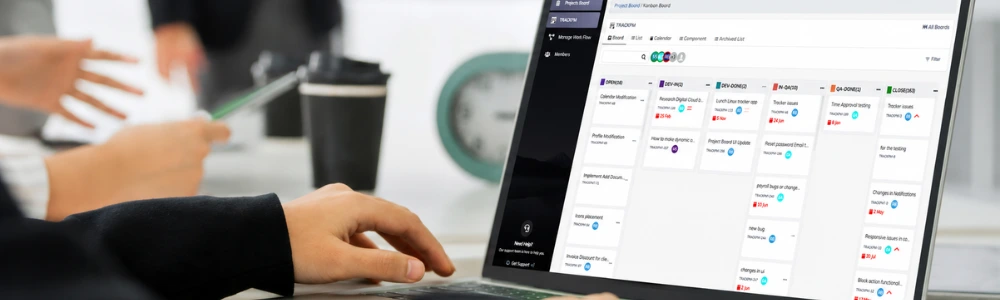
- Kanban boards and Scrum boards for project work.
- Time tracking tied to your projects, with screenshots.
- Attendance and leave management, plus a holiday calendar your admin sets up.
- Payroll, asset and inventory management, file management and reports in the same platform.
- Built by an India-based team for Indian IT teams.
What TrackPM is not
TrackPM is not an all-purpose workspace. It has fewer views, automations and integrations than ClickUp. If your company runs docs, goals and many departments' work in ClickUp, stay with it or compare carefully before you move.
Which should you choose?
| Your situation | A sensible choice |
|---|---|
| Several departments share one workspace for docs, goals and tasks | ClickUp |
| You rely on releases, complex workflows or code integrations | Jira |
| A small team that only needs simple boards | Trello |
| Your company already runs on Zoho | Zoho Projects |
| An IT services team that bills clients by the hour and also needs attendance and payroll | TrackPM |
Moving from ClickUp
- List the projects that are active. Archive the rest instead of moving them.
- Export the open tasks from ClickUp as a CSV file.
- Recreate your board columns and statuses in the new tool, and move only live work.
- Run both tools side by side for one sprint or billing cycle, then switch.
Frequently asked questions
Try TrackPM with your own team
30-day free trial for up to 2 users. No credit card required.
Related: TrackPM Kanban board, time tracker with screenshots, Jira alternatives, Hubstaff alternatives, Keka alternatives, all comparisons.
TrackPM is our product. Competitor details come from vendor pricing pages, help docs and published reviews, and we update this page when plans change. Found an error? Tell us at support@trackpm.com.