
Payroll Software for Startups and IT Companies
Last Updated: November 2026
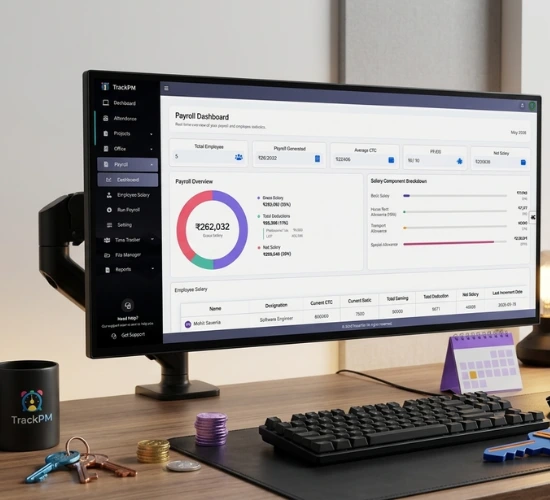
Salary, PF and ESI worked out from the attendance and leave already in TrackPM, with a payslip for everyone at the end of the month.
Payroll for Small IT Companies
If you run payroll from a spreadsheet, you know the routine: pull attendance from one place, leave from another, work out loss of pay, then do PF and ESI by hand. TrackPM does that from the attendance and leave it already has.
You can try it free for 30 days. After that, payroll is part of the HR module on our monthly plan; see pricing for the current rates.
What Is TrackPM Payroll?
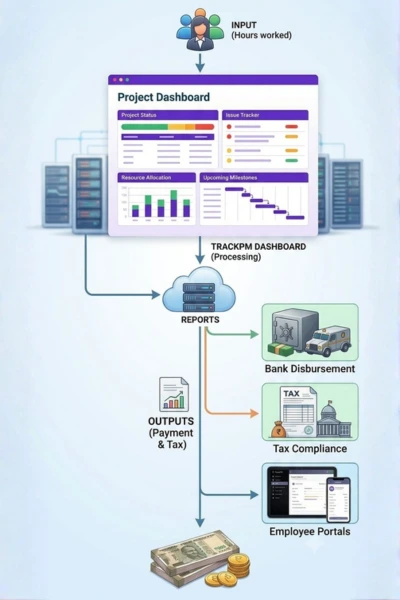
It's the salary part of TrackPM. You set up a salary structure for each person once. Each month, payroll reads their attendance and approved leave, deducts loss-of-pay days, calculates PF and ESI, and produces a payslip.
Because it uses the same records as your time tracker and leave approvals, the numbers on the payslip match what managers already signed off.
What It Does
1. Attendance and leave feed salary
- Attendance from tracked time. A day with tracked time counts as attended. Holidays and weekly offs are skipped.
- Leave. Approved paid leave counts as paid; unpaid leave becomes loss of pay.
- Loss of pay. LOP days are deducted, and PF wages can be prorated for them too.
2. Salary structures
- CTC, basic and allowances set per employee.
- Custom components. Add your own earnings and deductions, as fixed amounts or percentages.
- Salary groups. Apply the same components to a group of employees.
- Increments. Record a raise and the date it took effect.
3. PF and ESI
- PF. Employee 12%, and the employer share split into EPS and EPF, plus EDLI and admin charges. Choose the wage basis and whether to cap at the ceiling.
- ESI. Eligibility checked against the wage limit, with coverage kept for the whole contribution period.
- UAN, PF and ESI numbers stored on each employee.
4. Payslips and records
- Payslips for every employee, each month.
- Payment status. Mark salaries as paid, with the date and method.
- Expenses. Add approved expense reimbursements to the month's pay.
- Secure storage. Records are kept on AWS, and only people with the right role can see salaries.
What it doesn't do yet
TrackPM doesn't calculate TDS from tax slabs or professional tax from state rates. You can add either as a fixed deduction. It also doesn't send salary payments to banks; you pay as you do today and mark the salary as paid.
How It Works
1. Add your team
Invite your employees and set up a salary structure for each: CTC, basic, allowances, and whether PF and ESI apply.
2. Let attendance build up
Your team tracks time with the desktop app on Windows, macOS or Linux, and applies for leave in TrackPM. That becomes the month's attendance.
3. Run payroll
At month end, generate payroll. Check the days, deductions and net pay for each person, then share the payslips and mark salaries as paid.
Who It's For
Small and mid-sized IT companies, agencies and startups whose payroll is mostly salary, PF, ESI and loss of pay, and who want it in the same tool as their projects and time tracking.
If you have several legal entities, complex incentive plans, or need TDS and professional tax worked out for you, a dedicated payroll product is a better fit today.
Explore other features
Everything you need to manage your workspace in one place